Ask a Question About This Product
Our in-house experts typically reply within one business day.
Our in-house experts typically reply within one business day.

Blue Ox




Always the correct part
We know our products
Quality Products
Free Shipping!
Always the correct part
We know our products
Quality Products
Free Shipping!

All Electric Power Source: This brake controller is fully electric, ensuring reliable and consistent performance.
Power Source: All Electric
532: Black & Gray
Housing Material: Plastic
Universal or Specific Fit: Universal
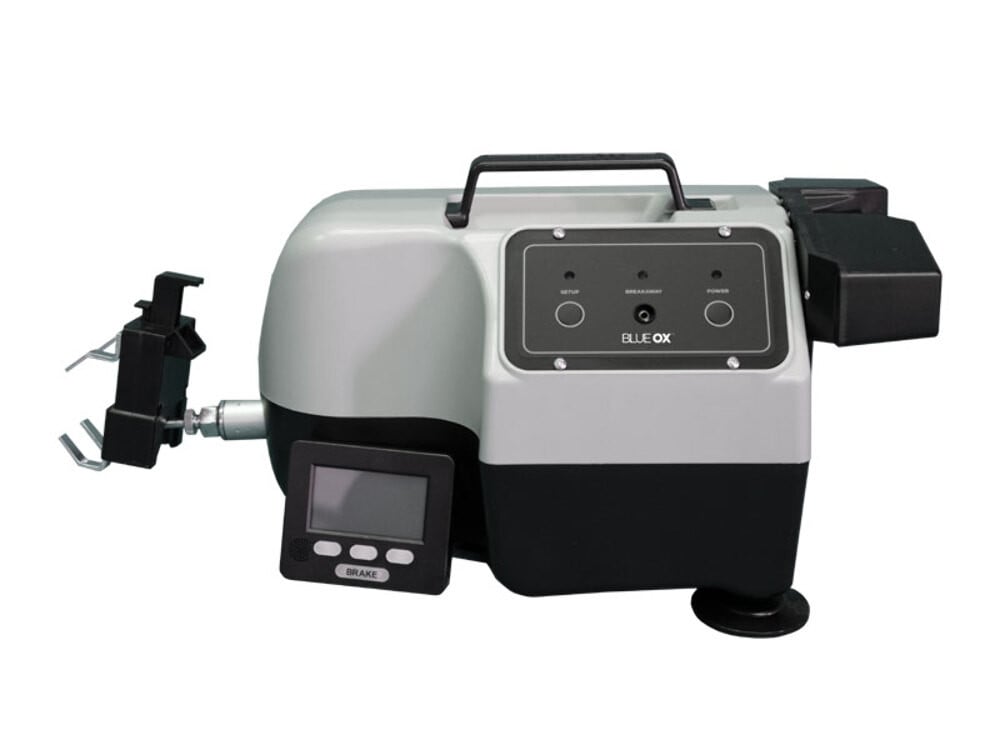
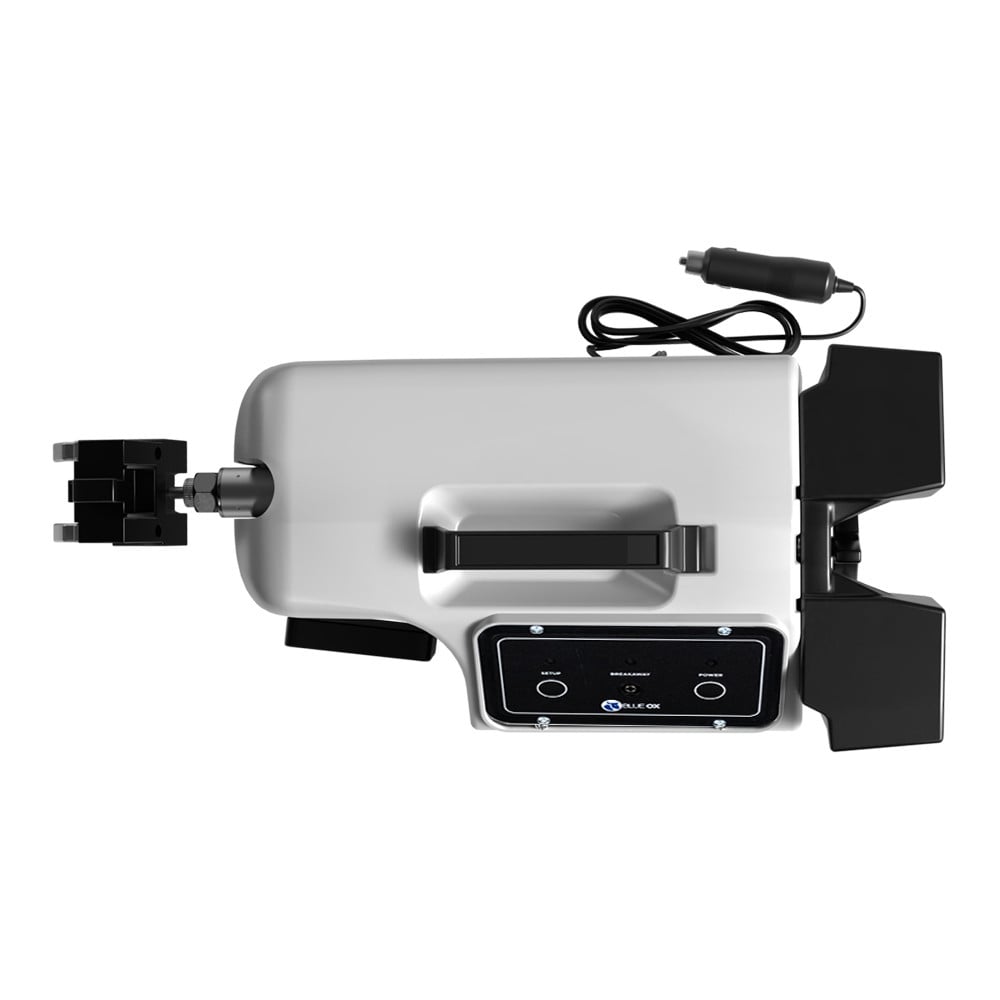
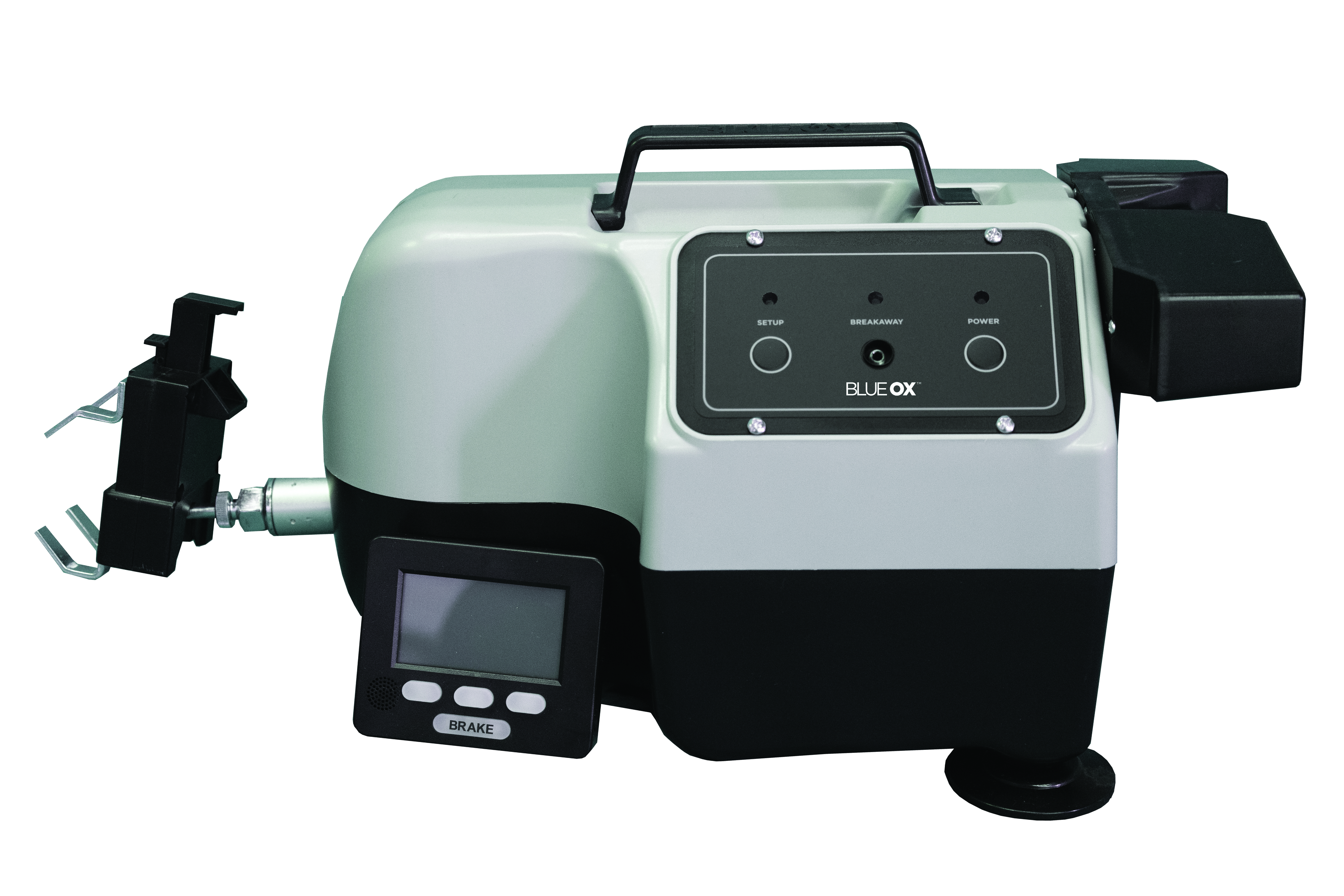
Introducing the cutting-edge Blue Ox Patriot Flat Towing Brake, BRK2022. This all-electric, self-contained, and tankless design is the latest in advanced towing technology. With a more compact profile, it is designed to fit a wider range of vehicles, and its reduced weight makes it easier to install and handle. A speedier actuator to pedal time means faster response times for enhanced safety. The BRK2022 is versatile, compatible with all flat towable vehicles, including hybrids. This kit comes complete with a radio frequency (RF) controller, a break-away for emergency situations, and a reassuring two-year warranty.

Blue Ox is known internationally for recreational and commercial towing products, manufacturing in Pender, Nebraska since 1925. The line covers tow bars and vehicle-specific baseplates for flat towing behind a motorhome, sway control and weight distributing hitches, supplemental braking accessories and towing wiring, backed by patented designs and long-standing customer service.
Blue Ox has manufactured since 1925 and is recognised internationally for towing products and customer service. The company operates from Pender, Nebraska, where it grew out of Automatic Manufacturing Co., a business that started with cattle oilers and developed into agricultural equipment, tractor accessories and trailer towing hardware. That agricultural engineering heritage still shows in how the towing products are built, and the company holds patents across weight distribution, fifth wheel and tow bar designs.
Flat towing is the discipline Blue Ox is best known for. Towing a car with all four wheels on the ground behind a motorhome demands a system that stays rigid under braking, articulates properly over uneven ground, and connects to the towed vehicle at points strong enough to take the load. Blue Ox tow bars handle the first two, with self-aligning arms that latch under tension and release without a struggle when the load is off them. Vehicle-specific baseplates handle the third, engineered per make and model to tie into structural mounting points behind the fascia.
The wider flat towing range covers supplemental braking systems, safety cables and the accessories that make a complete legal setup, along with baseplate wiring and dinghy towing harnesses that pass lighting signals to the towed vehicle without back-feeding its electrical system.
For conventional trailer towing, Blue Ox weight distributing hitches with integrated sway control transfer tongue load onto the tow vehicle's front axle and resist the yaw that crosswinds and passing trucks induce.
The company describes its foundation as customer service, designing around what owners actually ask for, and it runs an RV park adjacent to the factory where customers can stay. Sister operations at the same Nebraska site include Automatic grain roller mills and MAD-RAMPS pivoting ramp systems.
Experts available to answer your questions
Call 888-634-94942 Years
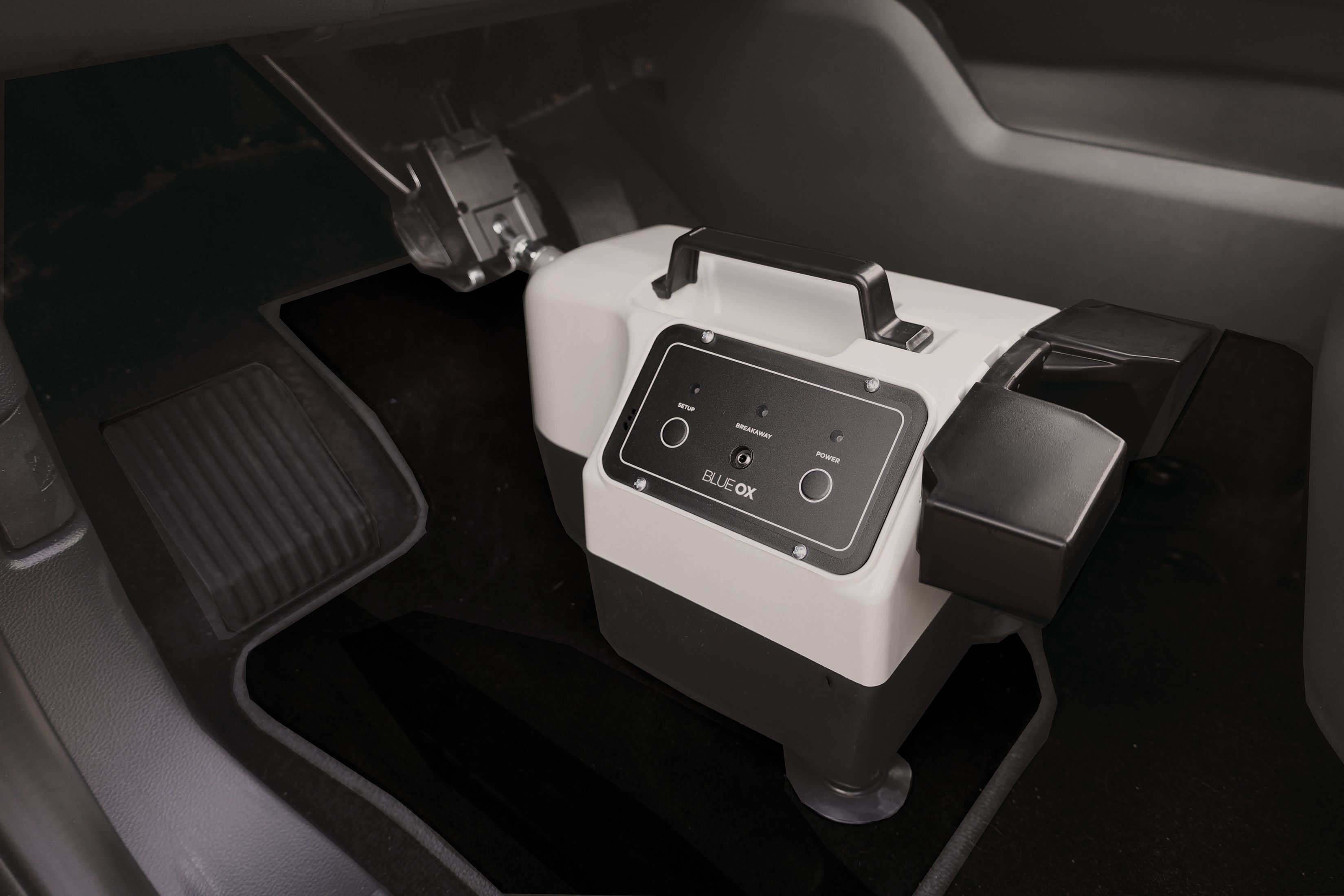
The Patriot® is an inertia-based braking system that automatically applies the brakes on a towed vehicle when the motorhome brakes. It uses an actuator arm and brake claw to press the towed vehicle's brake pedal. The system is controlled by a 2-Way RF In-Coach Controller mounted in the motorhome, which allows the driver to monitor brake status, adjust braking force, and manually activate the brake if needed. A breakaway switch automatically applies full braking if the motorhome and towed vehicle separate.
The system includes: (1) Patriot® Unit, (2) 2-Way RF In-Coach Controller, (3) Magnetic Holder for RF Controller, (4) 2 Brake Feet, (5) Breakaway Switch, (6) Breakaway Lanyard, (7) Breakaway Cable, and (8) XL Top Fangs. Verify all items are present when unpacking. If any items are missing, contact a Blue Ox® Dealer or Distributor, or call Customer Care at (402) 385-3051.
Yes. When installing on hybrid vehicles or vehicles with continuous power assist brakes, you must set the brake to Hybrid mode. Access the FORCE adjustment screen on the remote, use the left button to lower the Force setting all the way past 0 until you see 'H' for Hybrid mode, then press OK. Use the MAX FORCE setting in the SETUP menu to adjust how hard the brakes apply in Hybrid mode. The manual notes that the tow brake must be in Hybrid mode for any continuous power assist brakes or hybrid vehicles.
If the driver seat does not move far enough forward to touch the back of the brake, the BRK2502 brake rod extension can be inserted between the brake claw and the actuator arm. The BRK2502 should also be used if there is a low steering column or dashboard that touches and interferes with the brake. Contact a Blue Ox® Dealer or Distributor, or call Customer Care at (402) 385-3051 to order the BRK2502.
The Patriot® requires a constant 12-volt power source. The brake unit plugs into a 12V outlet in the towed vehicle, and the RF In-Coach Controller plugs into a 12V outlet in the motorhome. If the towed vehicle does not have a live 12V outlet while towing, an accessory 12V outlet such as the BX88459 is needed. The indicator light on the power cord will glow when receiving power.
A Phillips head screwdriver is needed to remove and adjust the top fangs on the brake claw. For breakaway switch installation, a bolt and lock nut are required (do not use a self-tapping screw). If drilling a firewall hole for the breakaway cable, a drill capable of making a ½" diameter hole is needed. Wire ties or nylon ties are used to secure the breakaway cable in the engine compartment. An adhesive remover product may be needed if the RF controller holder is removed from the motorhome.
Open the driver side door and push the driver seat back as far as possible. Make sure the towed vehicle is not running—any time the towed vehicle is started up, the brake needs to be reset. Ensure a constant 12-volt power source is available (check for a live 12V outlet while towing; if not available, an accessory outlet like BX88459 is needed). Identify a sturdy location on the front of the towed vehicle for the breakaway switch, preferably on the driver side and easily reachable. Locate the brake pedal and ensure the brake claw can fit around it.
Find a sturdy, easy-to-reach location to mount the RF In-Coach Controller. The dashboard is the suggested mounting point, but anywhere that is secure and accessible to the driver will work. Thoroughly clean the surface you will attach the remote holder to, then attach the remote holder using the adhesive and firmly press against the surface. The product can be used immediately, but full adhesion strength will take 1 hour; do not apply excess force until the adhesive has bonded. The remote has a built-in metal disc that will attach to the magnetic holder.
1. Open driver side door and push seat back as far as possible. 2. Place the Patriot® unit on the floor. 3. Open the brake claw and secure it on the brake pedal. 4. Attach feet if needed and adjust for proper height on uneven floorboards. 5. Plug the power cord into a constant 12V power source (indicator light will glow). 6. Verify the towed vehicle is not running. 7. Press the power button; the actuator will briefly adjust and lights will blink in a repeating sequence. If lights are solid blue and red, pull the brake unit back away from the pedal until lights switch to blinking blue and green. 8. Adjust the push pad up or down for proper height in relation to the seat. 9. Slide the driver seat forward against the push pads; if lights turn solid blue and red, slide the seat back until lights resume normal blinking sequence. 10. Press the SETUP button; the actuator arm will cycle once and remain in ready position. The power light will illuminate green if setup is proper. For hybrid vehicles, ensure the brake is in Hybrid mode.
To open: Place your thumb on top of the claw and place your pointer finger under the back ledge (right side). Pinch your fingers together until the claw locks in place. To close: Position the claw onto the brake pedal, then press the button on top of the claw or push the front button against the brake pedal. Caution: Make sure your fingers are not between the upper and lower half of the claw when you press the button. You can adjust the size of the claw by changing where the top fangs are mounted or by switching out the top fangs for the XL fangs using a Phillips head screwdriver.
The breakaway system automatically activates the Patriot® to apply full brakes on the towed vehicle if the motorhome separates from the towed vehicle. This emergency system is required by most states and provinces. To install: (1) Secure the breakaway switch onto the front of the towed vehicle in a sturdy, convenient location, preferably on the driver side, with the pin facing the motorhome. (2) Use a bolt and lock nut to attach it (do not use a self-tapping screw). (3) Ensure the switch is securely attached and the pin can be removed without interference. (4) Plug the cable into the breakaway switch. (5) Route the cable to the Patriot® Brake using either Method 1 (through the firewall with a ½" grommet) or Method 2 (through the door/window). (6) Plug the cable into the Patriot® Brake. Keep the breakaway cable clear of the tow bar, safety cables, electrical cord and moving parts.
Method 1 (Through the firewall): (1) Look for a pre-existing hole in the firewall; if no hole exists, drill a ½" diameter hole. Insert a grommet into the hole. Make sure not to damage any components on either side of the firewall while drilling. (2) Find a path for the cable through the engine compartment to the firewall. Use wire ties to secure the cable, avoiding any hot or moving engine parts. (3) Insert the cable into the grommet and pull the excess slack into the driver's compartment. Seal around and inside the grommet with silicone sealant. (4) Plug the cable into the Patriot® Brake. When not in use, the cable can be tucked away.
Method 2 (Feeding the cable through the door/window): (1) Find a path for the cable through the engine compartment to the rear of the hood or base of the windshield on the driver's side. Use nylon ties to secure the cable, avoiding any hot or moving engine parts. (2) Either roll down the window and thread the cable through, or open the door and thread the cable through. (3) Make sure excess slack is safely coiled inside the driver's cockpit. (4) Once the cable is through and connected, close the door or window. (5) Plug the cable into the Patriot® Brake.
The remote comes already paired with the unit, so pairing is not required for initial setup. However, if your remote is not receiving a signal or you need to pair a new or unpaired remote module, follow these steps: On the remote, press SETUP to access the SETUP menu, press DOWN to choose PAIR REMOTE, press OK to select it, then press START and leave the remote on this screen. On the brake unit, hook it up in the towed vehicle and follow the setup procedure. Once the brake is on and set up, hold the SETUP button for 1 second. Return to the remote to ensure the devices have been paired. If paired successfully, the 4-digit code after 'PAIR ACTIVE' will have updated to the new brake ID. Press OK to return to the SETUP menu, then OK again to return to the main screen.
The operating temperature of the Patriot® is between -20°F and 120°F.
The power cord contains an AGC-10 fuse. If the red LED on the power cord does not light up when the brake is plugged into a working power outlet, the fuse may need to be replaced. This fuse protects the brake from electrical overload. If you are unsure about replacing the fuse, contact a Blue Ox® Dealer or Distributor, or call Customer Care at (402) 385-3051.
Read all technical documents, warnings, cautions, tips, and notes in this manual before attempting to operate the Patriot® for the first time. Improper installation, use or maintenance may result in malfunction causing personal injury or property damage. Register your unit via www.blueox.com within ten days of delivery. Your serial number is located on the outside of the manual packaging and on the bottom of the Patriot® unit. Always follow the towing procedures in your vehicle's owner's manual. Do not modify the Patriot® in any way not authorized by Blue Ox®, as it will void the warranty.
Shut off the unit and unplug the RF controller when you stop driving for the day. Do not leave the unit plugged in all night. This helps preserve the supercapacitors and extends the life of the system.
To satisfy FCC RF exposure requirements, a separation distance of 20 cm (approximately 8 inches) or more should be maintained between the antenna of the RF controller and persons during operation. To ensure compliance, operation at closer than this distance is not recommended. The antenna(s) used for this transmitter must not be co-located or operating in conjunction with any other antenna or transmitter.
While the Patriot® Brake can function independently, the RF controller is strongly recommended because it provides critical operational feedback. Without it, you will not receive alerts designed to prevent vehicle damage, such as 'Braking Detected' notifications and other error messages. The controller allows you to monitor brake status, adjust braking force, and manually activate the brake if needed. Error messages appear only on the remote, not on the brake unit itself.
After setup, verify that the power light on the remote illuminates green, indicating the brake is set up properly. Check that the indicator lights on the brake unit are blinking in a blue and green sequence (not solid blue and red, which indicates too much pressure on the brake pedal). Ensure the driver seat is not putting any pressure on the back of the brake unit. Verify that the brake claw is securely attached to the brake pedal. If a breakaway switch is installed and plugged in, the 'BRK/AWAY READY' message should appear on the remote. Test the brake by pressing the BRAKE button on the remote while the vehicle is moving to ensure it is working correctly.
If the lights on the Patriot® are solid blue and red, there is too much pressure on the brake pedal. Pull the brake unit back, away from the pedal until the lights switch to a blinking blue and green sequence. You will be unable to continue setup until the lights flash blue and green. If this occurs again when you slide the driver seat forward, slide the seat back until the lights resume the normal blinking sequence. The seat should not put any pressure on the back of the brake unit.
Do not use any type of solvent or spray cleaner on the Patriot® Braking System. The recommended cleaning procedure is to wipe down the exterior with a damp cloth, then wipe down with a dry cloth. Store the unit in a clean, dry place when not in use. The power cord contains an AGC-10 fuse; if the red LED on the power cord does not light up when the brake is plugged into a working power outlet, the fuse may need to be replaced. The Patriot® requires minimal maintenance. If you do not feel confident in your ability to perform occasional maintenance, consult your Blue Ox® Dealer or Professional Installer.
If the remote is not receiving a signal, first check the position of the controller—it may be too far from the brake unit. If the problem persists, you will need to pair your remote with the brake unit. Access the SETUP menu on the remote, choose PAIR REMOTE, press OK, then press START and leave the remote on this screen. On the brake unit, hook it up in the towed vehicle and follow the setup procedure. Once the brake is on and set up, hold the SETUP button for 1 second. Return to the remote to ensure the devices have been paired. If paired successfully, the 4-digit code after 'PAIR ACTIVE' will have updated to the new brake ID. If the problem persists, contact Blue Ox® Customer Care Team at (402) 385-3051.
The 'CHECK POWER CONNECTION' message appears when the brake reads an input voltage below 10V, meaning the towed vehicle's battery is very low or the brake is no longer receiving power from the car receptacle. The brake will go into an idle state and will not work for normal braking, but it will still work in the event of a breakaway. When it is safe to do so, pull over and inspect the towed vehicle. Check the indicator light on the power cord to see if the brake is receiving power. If the light is on, check the towed vehicle's battery voltage. If power is restored, the status light will change back to green and you are OK to resume your trip. Anytime the towed vehicle is started up, the Patriot® needs to be reset.
If the brake is plugged in with the red light shining on the power cord but is not responding to button presses or commands from the remote, press and hold both the SETUP and POWER buttons at the same time for 1 second. This will reset the brake. If the error persists, unplug the unit and wait 45 minutes for the supercapacitors to fully drain, then plug it back in and try again. If the problem continues, contact Blue Ox® Customer Care Team at (402) 385-3051.
A flashing orange light after the SETUP button is pressed means the Patriot® is still charging its supercapacitors and does not have adequate power. Wait 20 seconds with the brake turned on, then power the brake off and on to retry setup. If the problem persists, wait longer before attempting setup again.
If the remote screen turns yellow or red, an error has occurred. Check the display screen on the Patriot® remote to see what error message is shown. Errors with a yellow screen will prevent the brake from working properly but do not require you to immediately pull over. Errors in red require you to immediately pull over and address them. Failure to address red errors may cause brake damage. Refer to the error codes section in the manual for specific error messages and corrective actions. If you require assistance, contact Blue Ox® Customer Care Team at (402) 385-3051.
A 'LOADCELL ERROR' message indicates that a fault has been detected with the Patriot® load cell. This is a serious error that requires professional service. Please call Blue Ox® Customer Care Team at (402) 385-3051 for service.
The Patriot® load cell has detected pressure when it is fully retracted. The brake will continue to work, but you need to reset and re-setup the brake to stop the alarm and ensure the brake is working properly. To reposition the brake: (1) Adjust the push pads up or down to get better contact with the driver's seat. (2) Make sure the back of the brake unit is resting against the front of the driver's seat. (3) Ensure the brake claw is securely attached to the brake pedal. Note: The seat should not put any pressure on the back of the brake unit. After repositioning, go through the setup procedure again.
If the unit has entered a BREAKAWAY state and the brake is being fully applied, and you believe the vehicle is still firmly attached to the RV and are unable to pull over, you can deactivate the breakaway by holding down both the left and right buttons on the remote. As soon as it is safe to do so, pull over, secure the car, and check all breakaway connections. If the error is cleared, you may continue driving. If the breakaway activates again, there may be a loose connection or the breakaway switch may need adjustment. Contact Blue Ox® Customer Care Team at (402) 385-3051 if the problem persists.
If the unit fails to successfully setup twice in a row, perform the following: (1) Adjust the push pads up or down to get better contact with the driver's seat. (2) Make sure the back of the brake unit is resting against the front of the driver's seat. (3) Ensure the brake claw is securely attached to the brake pedal. Note: The seat should not put any pressure on the back of the brake unit. After making these adjustments, go through the setup procedure again. If setup continues to fail, contact Blue Ox® Customer Care Team at (402) 385-3051 for assistance.
The 'RESET TOW BRAKE' error message indicates that the brake has detected an error and will not activate until you reset the brake. Go through the setup procedure again to reset the brake. If this error persists after resetting, contact Blue Ox® Customer Care Team at (402) 385-3051 for assistance.
The Patriot® is designed for towed vehicles behind motorhomes. It works with most vehicles that have a brake pedal accessible from the driver's seat. If the driver seat does not move far enough forward to contact the brake, the BRK2502 extension is available. For hybrid or continuous power assist brake vehicles, the brake must be set to Hybrid mode. Contact Blue Ox® at (402) 385-3051 or visit www.blueox.com for specific vehicle compatibility.
A Phillips head screwdriver is needed to adjust the brake claw fangs. For breakaway installation, you will need a drill (for a ½" hole if needed), wire ties, a bolt and lock nut, and silicone sealant. No special lifting equipment or professional installation is required for basic setup.
Drilling is only required if you choose to route the breakaway cable through the firewall and no pre-existing hole is available. In that case, you will need to drill a ½" diameter hole and insert a grommet. Alternatively, you can route the breakaway cable through the door or window without drilling. Basic brake installation does not require drilling.
No, the manual does not require disconnecting the towed vehicle's battery. However, the towed vehicle must not be running during setup. Anytime the towed vehicle is started up after installation, the Patriot® needs to be reset.
The Patriot® requires a constant 12-volt power source. The brake unit plugs into a 12V outlet in the towed vehicle, and the RF controller plugs into a 12V outlet in the motorhome. If the towed vehicle lacks a live 12V outlet while towing, an accessory outlet such as the BX88459 is needed.
Do not use solvents or spray cleaners. Wipe the exterior with a damp cloth, then wipe with a dry cloth. Store in a clean, dry place. The power cord contains an AGC-10 fuse that may need replacement if the red LED does not light when plugged into a working outlet.
After setup, the power light on the remote should illuminate green, and the indicator lights on the brake unit should blink in a blue and green sequence. If the lights are solid blue and red, there is too much pressure on the brake pedal. The seat should not put any pressure on the back of the brake unit. If a breakaway switch is installed, the 'BRK/AWAY READY' message should appear on the remote.
Free Shipping
Ships free on all orders
 Authorized Dealer

Quick Ship
In stock and ready to ship — order now!
FREE ShippingFREE SHIPPING
Estimated delivery Fri, Oct 9 - Mon, Oct 12
Order before 2 PM EST Monday–Friday for same-day processing
Guaranteed safe & secure checkout
No reviews have been added for this product.